Why AngularJS?
AngularJS is a MVC framework that defines numerous concepts to properly organize your web application. It enhances HTML by attaching directives to your pages with new attributes or tags and expressions in order to define very powerful templates directly in your HTML. It also encapsulates the behavior of your application in controllers which are instanciated thanks to dependency injection. AngularJS helps you structure and test your Javascript code very easily. Finally, utility code can easily be factorized into services that can be injected in your controllers. Now let’s have a closer look at all those features.
Expressions
AngularJS contains several concepts to separate the different parts of your application.
In order to create the views of your application, AngularJS let you execute expressions directly within your HTML pages. In those expressions, you have access to Javascript code which give you the ability to realize some computation in order to display what you want.
In order to structure you web application, AngularJS will give you a much impressive tool, directives.
Directives
Directives are one of the most powerful feature of AngularJS. They allow you to extend HTML to answer the needs of web applications. Directives let you specify how your page should be structured for the data available in a given scope.
AngularJS comes with several directives which let you build your basic application. The first directive you will use most of the time is "ngRepeat”. This directive let AngularJS create a new set of elements in the dom for each element in a collection.

We could prefix “ng-repeat" by “data-", have a look here.
AngularJS also let you determine if an element should be displayed or not with the directive "ngShow”. This directive uses an expression which returns a boolean to determine if the element should be displayed or not.

AngularJS also contains more complex directives like "ngSwitch”.

With those directives, you have the ability to define the basic structure of your web application very easily.
Directives coming from the AngularJS standard library are named “ngMyAwesomeDirective" and used in the view using an attribute “ng-my-awesome-directive" or “data-ng-my-awesome-directive”. Some directives can also be used as comments, DOM elements name or even CSS classes.
Data Binding
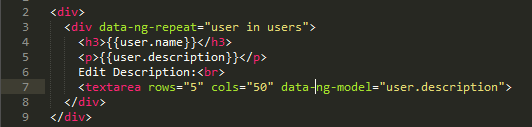
Angular does not only let you structure your views with directives, it also give you the ability to define the binding between the data in your scope and the content of your views.
You can also create bidirectionnal binding in AngularJS very easily with the directive "ngModel”.
Filters
In order to change the way your data are displayed in your page, AngularJS provides you with the filter mechanism.
You can also easily create you own filters.
Partial Views
AngularJS is very good to build single page web applications. For those who are not familiar with this concept, it consists on a web application where you only have one “real" HTML page whose content can be changed in Javascript without having to download a new page. The new content is created programmatically in Javascript of with the use of templates. Those applications have advantages like performances (since you are not downloading a new HTML page each time you are navigating to a new page) and drawbacks like history management (what happens if your users click on the button back of their browser?).
With AngularJS, you see that you are using a framework created by people who know what they are doing, as a result most of the problems of regular single page web applications are handled by AngularJS itself.
In order to build your application, You define a main page (index.html) which acts as a container for your web application. In this page, you can bind part of your application to a specific AngularJS module with the directive "ngApp”. You can bind the whole page to a single AngularJS module if you want. After that, you can use the directive "ngView" in order to use partial views.
Your module will tell AngularJS which view should be display in the “ngView" element. This directive also let you separate the content of your application in dedicated files.
Modules
Now let’s have a look under the hood. In AngularJS, applications are structured in modules. A module can depend on other modules and a module can contain controllers, services, directives and filters.

Since AngularJS has been created to build maintainable web applications, it helps you to separate your application in small, easily testable, components. As a result, AngularJS will often rely on dependency injection in order to plug the various components of your application together.
Dependency Injection
The operation “config" is using dependency injection in order to retrieve some elements of the application that should be configured when the module will be loaded. Here, we will use the service provider "$routeProvider" in order to define the routes of our application. You have two ways of using dependency injection in AngularJS. You can pass a function to the operation with parameters named after the elements that you want to retrieve.

This solution is not really recommended since minification of the code would change the name of the variable which would prevent your application from working. If you want to use a robust solution, you should use an array with the name of the elements that you want to see injected and a function naming those elements.

The name of the parameter of the function does not have to be the same as the name of the element injected.
Routes
Using the route provider, we can configure the routes available in our application.
Controllers
In AngularJS, the controller is where the behavior of your application is located. Controllers are used to populate the scope with all the necessary data for the view. Using proper separation of concerns, controllers should never contain anything related to the DOM.
Controllers communicate with the view using a specific service named "$scope". This service let the controller give objects and functions to the views that can later be manipulated with expressions and directives. In order to be easily tested, controllers are defined using dependency injection.

Scope
The scope is used to link the controllers and the views to which they are binded. A controller can add data and function in its scope and then they will be accessible in the view.
Without digging into the details too much, when changes are occuring on the scope, events are fired to warn those who are interested. The views are using those events to know if they should refresh the elements involved.
Watch
AngularJS comes with lot of operations to manipulate the scope. AngularJS provides the necessary tool to observe the changes on the data of the scope from the controller. With the operation "$watch", a controller can add a listener on an attribute of its scope.

Events and root scope
AngularJS also gives you access to a system of events and listeners on the scope. You can use the operation "$broadcast" in order to fire an event on a specific scope, then the event will be transmitted to the selected scope and all its children. If you want to send an event to the whole application, you can use the root scope thanks to $rootScope.
Services
While controllers contains the behavior of the application that should be available to the view, you may have some code that you want to re-use or that you want to abstract from the controller which communicates directly with the view. For this, AngularJS let you define services that can be injected in your controllers or in other services to build your application.
If you want to communicate with a server for example, you can inject the $http service into your own service. This service can be injected in your controller which will not have to manipulate HTTP requests directly.

REST communication
In order to communicate with a restful server, AngularJS provides two services $http and $resource. $http is a small layer on top of XmlHttpRequest while $resource is working at a higher level of abstraction, both can perform the same job.
$resource let you communicate with a server using custom actions instead of relying on the default get, post, delete, etc. Those custom actions are binded to the default HTTP method. “Get" is using the method GET while “save" is using the method POST etc. Keep in mind that thisservice comes from the module “ngResource". As such, your module will need a dependency to “ngResource" in order to let you inject "$resource" in your code.
In order to make sure that you can test your application easily, AngularJS also comes with a $httpBackend mock to test HTTP requests without a web server.

Custom directives
AngularJS provides you with directives in order to extend regular HTML. You can also create you very own directives in order to adapt your views to your needs. If you need to have Javascript code in order to manipulate the DOM, it should not be located in a controller but in your own custom directive.
Directives are among the most powerful mechanisms of AngularJS and as such you have access to tons of options in order to build your own. You should definetly have a look at the documentation to learn more about everything you can do with directives.

The original blog is here
To know more about AngularJs click here

No comments:
Post a Comment