Monday, 21 October 2013

Introduction to PostgreSQL

About PostgreSQL.

PostgreSQL is a powerful, open source object-relational database system. It has more than 15 years of active development and a proven architecture that has earned it a strong reputation for reliability, data integrity, and correctness. It runs on all major operating systems, including Linux, UNIX (AIX, BSD, HP-UX, SGI IRIX, Mac OS X, Solaris, Tru64), and Windows. It is fully ACID compliant, has full support for foreign keys, joins, views, triggers, and stored procedures (in multiple languages). It includes most SQL:2008 data types, including INTEGER, NUMERIC, BOOLEAN, CHAR, VARCHAR, DATE, INTERVAL, and TIMESTAMP. It also supports storage of binary large objects, including pictures, sounds, or video. It has native programming interfaces for C/C++, Java, .Net, Perl, Python, Ruby, Tcl, ODBC, among others.


Prerequisites.

We can install PostgreSQL database on ubuntu based systems using the following command:
          $ sudo apt-get install postgresql


Basics of PostgreSQL database.

The user "postgres" should have already been configured by the installation. A password will be missing.
As root issue the command: passwd postgres to assign a password for user postgres.
Login as user postgres: su – postgres
Create s database: createdb testdb
Connect to database: psql testdb
          Leads you to a command prompt like this:
                         testdb=#
          Enter \q to exit
Following commands are useful:
  • \l : List databases
  • \c database-name : List databases
  • \d : List tables in database
  • \d table-name : Describe table
  • select * from table-name : List table contents
More Commands:
Create a user:
  • Command line: [prompt]$ createuser dude
  • SQL: CREATE USER dude WITH PASSWORD 'supersecret';
    Change with
    ALTER USER

Grant Privilages:
  • SQL: GRANT UPDATE ON table-name to dude
  • SQL: GRANT SELECT ON table-name to dude
  • SQL: GRANT INSERT ON table-name to dude
  • SQL: GRANT DELETE ON table-name to dude
  • SQL: GRANT RULE ON table-name to dude
  • SQL - Do it all: GRANT ALL PRIVILEGES ON table-name to public
Delete a user:
  • Command line: [prompt]$ dropuser SuperDude
Delete a database:

Command line:
  • [prompt]$ destroydb testdb
  • [prompt]$ dropdb testdb
SQL: 
  • DROP DATABASE testdb;
Create a database:
  • Command line: [prompt]$ createdb testdb -U user-name -W
    You will be prompted for a password. (or execute as Linux user postgres without -U and -W options)
  • SQL: CREATE DATABASE testdb
Backup a database:
  • [prompt]$ pg_dumpall > outfile
  • [prompt]$ pg_dumpall -Fc dbname > outfile
Version Upgrades:
  • Dump: [prompt]$ postgresql-dump -t /var/lib/pgsql/backup/db.bak -p /var/lib/pgsql/backup/old -d
  • Restore: [prompt]$ psql -e template1 < /var/lib/pgsql/backup/db.bak
    The table template1 is the default administrative database.
User Managements:
User Creation:
Command line:
  • [prompt]$ createuser john
SQL: 
  •  CREATE ROLE john;

To add login privilege:
  • CREATE ROLE john LOGIN;
  • CREATE ROLE john WITH LOGIN; # mimic of above command
  • CREATE USER john; #alternative of CREATE ROLE which adds LOGIN
You can also add the LOGIN attribute with ALTER ROLE:
  • ALTER ROLE john LOGIN;
  • ALTER ROLE john NOLOGIN; # remove login
You can also create groups via CREATE GROUP (Which is now also aliased to CREATE ROLE), and then grant or revoke access to other roles:
  • CREATE GROUP admin LOGIN;
  • GRANT admin TO john;
  • REVOKE admin FROM john;


Pros and Cons of PostgreSQL.
Pros:
  • Very feature rich
  • GIS add-on functionality
  • Flexible full-text search
  • Multiple replication options to suit your environment and requirements
  • Powerful server-side procedural languages are available, and can be extended (PL/pgSQL is installed by default, but others like Perl, Python, Ruby, TCL, etc are available)
  • Writing your own extensions is pretty easy
  • Uses multi-version concurrency control, so concurrent performance rocks
  • Fully ACID compliant
  • Commercial support through multiple third-parties is available
  • Well-documented
  • Strong access-control framework
  • Ability to add a column on a large table without locking the thing for a huge amount of time.
  • Use multiple indexes.
  • The error messages are more informative.
  • PostgreSQL feels more like an open source Oracle

Cons:

  • Less-mature replication software
  • This may not be quite accurate, it's more that there's no single de-facto method that's recommended, widely-appropriate and widely-known by admins/users


Monday, 19 August 2013

Application with angularJs

AngularJS puzzle

Thursday, 1 August 2013

Start with AngularJS

Why AngularJS?

           AngularJS is a MVC framework that defines numerous concepts to properly organize your web application. It enhances HTML by attaching directives to your pages with new attributes or tags and expressions in order to define very powerful templates directly in your HTML. It also encapsulates the behavior of your application in controllers which are instanciated thanks to dependency injection. AngularJS helps you structure and test your Javascript code very easily. Finally, utility code can easily be factorized into services that can be injected in your controllers. Now let’s have a closer look at all those features.

Expressions

          AngularJS contains several concepts to separate the different parts of your application.
In order to create the views of your application, AngularJS let you execute expressions directly within your HTML pages. In those expressions, you have access to Javascript code which give you the ability to realize some computation in order to display what you want.
In order to structure you web application, AngularJS will give you a much impressive tool, directives.

Directives

          Directives are one of the most powerful feature of AngularJS. They allow you to extend HTML to answer the needs of web applications. Directives let you specify how your page should be structured for the data available in a given scope.
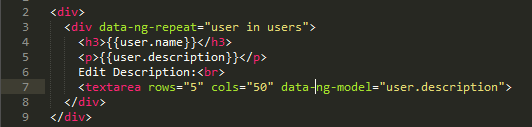
AngularJS comes with several directives which let you build your basic application. The first directive you will use most of the time is "ngRepeat”. This directive let AngularJS create a new set of elements in the dom for each element in a collection.


We could prefix “ng-repeat" by “data-", have a look here.
AngularJS also let you determine if an element should be displayed or not with the directive "ngShow”. This directive uses an expression which returns a boolean to determine if the element should be displayed or not.


AngularJS also contains more complex directives like "ngSwitch”.


With those directives, you have the ability to define the basic structure of your web application very easily.
Directives coming from the AngularJS standard library are named “ngMyAwesomeDirective" and used in the view using an attribute “ng-my-awesome-directive" or “data-ng-my-awesome-directive”. Some directives can also be used as comments, DOM elements name or even CSS classes.

Data Binding

          Angular does not only let you structure your views with directives, it also give you the ability to define the binding between the data in your scope and the content of your views.
You can also create bidirectionnal binding in AngularJS very easily with the directive "ngModel”.


Filters

          In order to change the way your data are displayed in your page, AngularJS provides you with the filter mechanism.
You can also easily create you own filters.

Partial Views

          AngularJS is very good to build single page web applications. For those who are not familiar with this concept, it consists on a web application where you only have one “real" HTML page whose content can be changed in Javascript without having to download a new page. The new content is created programmatically in Javascript of with the use of templates. Those applications have advantages like performances (since you are not downloading a new HTML page each time you are navigating to a new page) and drawbacks like history management (what happens if your users click on the button back of their browser?).
With AngularJS, you see that you are using a framework created by people who know what they are doing, as a result most of the problems of regular single page web applications are handled by AngularJS itself.
In order to build your application, You define a main page (index.html) which acts as a container for your web application. In this page, you can bind part of your application to a specific AngularJS module with the directive "ngApp”. You can bind the whole page to a single AngularJS module if you want. After that, you can use the directive "ngView" in order to use partial views.
Your module will tell AngularJS which view should be display in the “ngView" element. This directive also let you separate the content of your application in dedicated files.

Modules

          Now let’s have a look under the hood. In AngularJS, applications are structured in modules. A module can depend on other modules and a module can contain controllers, services, directives and filters.


Since AngularJS has been created to build maintainable web applications, it helps you to separate your application in small, easily testable, components. As a result, AngularJS will often rely on dependency injection in order to plug the various components of your application together.

Dependency Injection

          The operation “config" is using dependency injection in order to retrieve some elements of the application that should be configured when the module will be loaded. Here, we will use the service provider "$routeProvider" in order to define the routes of our application. You have two ways of using dependency injection in AngularJS. You can pass a function to the operation with parameters named after the elements that you want to retrieve.


This solution is not really recommended since minification of the code would change the name of the variable which would prevent your application from working. If you want to use a robust solution, you should use an array with the name of the elements that you want to see injected and a function naming those elements.


The name of the parameter of the function does not have to be the same as the name of the element injected.

Routes

          Using the route provider, we can configure the routes available in our application.


Controllers

          In AngularJS, the controller is where the behavior of your application is located. Controllers are used to populate the scope with all the necessary data for the view. Using proper separation of concerns, controllers should never contain anything related to the DOM.
Controllers communicate with the view using a specific service named "$scope". This service let the controller give objects and functions to the views that can later be manipulated with expressions and directives. In order to be easily tested, controllers are defined using dependency injection.


Scope

          The scope is used to link the controllers and the views to which they are binded. A controller can add data and function in its scope and then they will be accessible in the view.
Without digging into the details too much, when changes are occuring on the scope, events are fired to warn those who are interested. The views are using those events to know if they should refresh the elements involved.

Watch

          AngularJS comes with lot of operations to manipulate the scope. AngularJS provides the necessary tool to observe the changes on the data of the scope from the controller. With the operation "$watch", a controller can add a listener on an attribute of its scope.


Events and root scope

          AngularJS also gives you access to a system of events and listeners on the scope. You can use the operation "$broadcast" in order to fire an event on a specific scope, then the event will be transmitted to the selected scope and all its children. If you want to send an event to the whole application, you can use the root scope thanks to $rootScope.

Services

          While controllers contains the behavior of the application that should be available to the view, you may have some code that you want to re-use or that you want to abstract from the controller which communicates directly with the view. For this, AngularJS let you define services that can be injected in your controllers or in other services to build your application.
If you want to communicate with a server for example, you can inject the $http service into your own service. This service can be injected in your controller which will not have to manipulate HTTP requests directly.


REST communication

          In order to communicate with a restful server, AngularJS provides two services $http and $resource. $http is a small layer on top of XmlHttpRequest while $resource is working at a higher level of abstraction, both can perform the same job.
$resource let you communicate with a server using custom actions instead of relying on the default get, post, delete, etc. Those custom actions are binded to the default HTTP method. “Get" is using the method GET while “save" is using the method POST etc. Keep in mind that thisservice comes from the module “ngResource". As such, your module will need a dependency to “ngResource" in order to let you inject "$resource" in your code.
In order to make sure that you can test your application easily, AngularJS also comes with a $httpBackend mock to test HTTP requests without a web server.


Custom directives

          AngularJS provides you with directives in order to extend regular HTML. You can also create you very own directives in order to adapt your views to your needs. If you need to have Javascript code in order to manipulate the DOM, it should not be located in a controller but in your own custom directive.
Directives are among the most powerful mechanisms of AngularJS and as such you have access to tons of options in order to build your own. You should definetly have a look at the documentation to learn more about everything you can do with directives.


The original blog is here
To know more about AngularJs click here

Wednesday, 8 May 2013

A Short note about Virtual Environments.


Virtual Environments


A Virtual Environment, is an isolated working copy of Python which allows you to work on a specific project without worry of affecting other projects.
By using this, you can work on a project which requires Django 1.3 while also maintaining a project which requires Django 1.0.
virtualenv is a tool to create isolated Python environments.

Install it via pip:
     $ pip install virtualenv

Basic functions of virtualenv:
  1. Create a virtual environment
      $ virtualenv project
     This creates a copy of Python in whichever directory you ran the command in, placing it in a folder
     named project.
   
     2. Activating a virtual environment
    $ source project/bin/activate
     We can then begin installing any new modules without affecting the system default Python or other
     virtual environments.

    3. Deactivating a virtual environment
     
          $ deactivate

     This puts us back to the system’s default Python interpreter with all its installed libraries.

    4. Deleting a virtual environment
    To delete a virtual environment, just delete its folder.


virtualenvwrapper


virtualenvwrapper is a set of extensions to virtualenv tool. The extensions include wrappers for creating and deleting virtual environments and otherwise managing our development workflow, making it easier to work on more than one project at a time without introducing conflicts in their dependencies.

Features:
  1. Organizes all of your virtual environments in one place.
  2. Wrappers for managing your virtual environments (create, delete, copy).
  3. Use a single command to switch between environments.
  4. User-configurable hooks for all operations.
  5. Tab completion for commands that take a virtual environment as argument.
  6. Plugin system for more creating sharable extensions
Install it via pip:

$ pip install virtualenvwrapper
$ export WORKON_HOME=~/Envs
$ mkdir -p $WORKON_HOME
$ source /usr/local/bin/virtualwrapper.sh
$ mkvirtualenv env1

Now we can install some software into the environment:
(env1)$ pip install django

We can see the new package with lssitepackages:

(env1)$ lssitepackages
 Django-1.1.1-py2.6.egg-info     easy-install.pth
 distribute-0.6.10-py2.6.egg     pip-0.6.3-py2.6.egg
 django                          setuptools.pth
We can create multiple environments:
(env1)$ mkvirtualenv env2

and so on...

We can switch between environments with workon:

(env2)$ workon env1
(env1)$


Wednesday, 16 January 2013

Software as a Service

Here we discuss the main ideas of  Software Engineering for Software as a Service(SaaS) course by edX. This course teaches the fundamentals for engineering long-lasting software using Agile techniques and Ruby on Rails.

The introduction of the
edX - gives a comparison of software and hardware based on their nature.
Hardware designs are finished before manufactured and shipped to the respective vendors. If there is a bug in the hardware the only solution is to change the whole Hardware. Also the quality of the hardware diminishes with time and the cost of upgrade seems to be infinitely. Hardware prototypes aim at verification -ensuring that hardware meets the specifications.
On contrary, Software evolves over time and if there is a bug in a software only a software update is required to eradicate the bug. And cost of upgrade seems to be nearly zero. Software prototypes aims with validation, since unlike hardware; customers can demand and receive changes to software.

There are two kinds of softwares: Legacy S/W and Beautiful S/W.
 
Legacy s/w are those which satisfies users needs but difficult to evolve due to design inelegance or antiquated technology.Currently, 60% of s/w maintenance cost is used for adding new functionality to the legacy s/w and only 17% for bug fixing.
 
Beautiful s/w meets customer needs and are easy to evolve.
Yet, there is a third kind of software known as Unexpectedly short-lived code that doesn't meet customers’ requirements.

There are different approaches for s/w development.
First one is Waterfall model. The levels in waterfall model are:
  1. Requirement specification
  2. Design
  3. Construction(implementation or coding)
  4. Integration
  5. Testing and debugging
  6. Installation
  7. Maintenance
The main drawback of this model is that, when the customer is unclear or less specific about the requirements, the developed model mail fail to meet the goals.
The second one is Spiral model. In this model, a prototype is built in every phase discussed above and then developed in each phase.
  1. Determine the objectives, alternatives, and constraints on the new iteration.
  2. Evaluate alternatives and identify and resolve risk issues.
  3. Develop and verify the product for this iteration.
  4. Plan the next iteration.
This also helps in back tracking, reversing or revising the process.


The third is Agile model. The key features of this model are:
  • Embraces change as a fact of life: continuous improvement vs. phases.
  • Developers continuously refine working but incomplete prototype until customers happy, with customer feedback on each iteration (every ~2 weeks).
  • Agile emphasizes Test-Driven Development (TDD) to reduce mistakes, written down User Stories to validate customer requirements, Velocity to measure progress.

Testing and Formal methods

Testing cannot be exhausting. Testing has many levels:
  • The base thing is called unit testing. That's testing to see if a single method does what's expected.
  • The next level is module or functional testing to test across individual units, like with across classes versus within a class.
  • Integration testing is to try and see if a bunch of modules communicate correctly. It's a more narrow interface., and each time when we add one of these things, we're assuming the one below does that work.
  • Finally, at the top is system or acceptance testing, tests weather the whole program meet what the customer wants it to do.
Types of Testing:
  1. Coverage testing specifies the percentage of code paths that have been tested.
  2. Regression testing is used to automatically rerun old tests to ensure that the current version still works at least as well as it used to.
  3. Continuous integration testing, which means the entire program is tested every time new code is checked in, versus later phases.

Formal methods starts with formal specification and prove program behavior follows software specification. These are mathematical proofs, either done by a person or done by a computer using either automatic theorem proving or model checking.
Testing and formal methods reduce the risks of errors in designs.
Both hardware and software engineers developed four fundamental mechanisms to improve their productivity:
  • Clarity via conciseness
  • Synthesis
  • Reuse
  • Automation and Tools

Software as a Service (SaaS)

Software as a Service (SaaS) delivers software and data as a service over the Internet, usually via a thin program such as a browser that runs on local client devices instead of binary code that must be installed and runs wholly on that device. Eg: searching, social networking, and videos.

      The reasons for SaaS

  • Users don’t have to worry about hardware compatibility issues and version of the operating system.
  • No worries about losing data at remote site.
  • SaaS is appropriate for the group of users to interact with the same data.
  • When data is large or updated frequently, it is simpler to centralize data.
  • Only a single copy of the server software runs in hardware, which avoids the compatibility hassles for developers.


Service oriented Architecture(SOA)

SaaS is a special case of a software architecture where all components are designed to be services. SOA actually means that components of an application act as interoperable services, and can be used independently and recombined in other applications.The contrasting implementation is considered a 'software silo', which rarely has APIs to internal components.
SaaS has 3 demands on infrastructure,

  • Communication- Allow customers to interact with the services.
  • Scalability- Fluctuations in demand during new services to add users rapidly.
  • Dependability- Service and communication available at any time.
The critical distinction of SOA is that no service can name or access another service’s data; it can only make requests for data through an external API.
Collections of commodity small-scale computers connected by commodity Ethernet switches- clusters, offeres scalable and much cheaper serving.The public cloud services or utility computing offers computing, storage, and communication at pennies per hour.


Cloud Computing
Cloud Computing provides the scalable and dependable hardware computation and storage for SaaS. Cloud computing consists of clusters of commodity servers that are connected by local area network switches, with a software layer providing sufficient redundancy to make this cost-effective hardware dependable.


Tuesday, 8 January 2013

PAINT

paint


Google App Engine


Google App Engine lets you run web applications on Google's infrastructure. App engine does not need any servers to be maintained, we just need to upload the application in the framework.
App engine supports programmes written in languages such as java, python ,go etc.

Main features of app engine are:
  • Dynamic web serving, with full support for common web technologies
  • Persistent storage with queries, sorting and transactions
  • Automatic scaling and load balancing
  • APIs for authenticating users and sending email using Google Accounts
  • A fully featured local development environment that simulates Google App Engine on your computer
  • Task queues for performing work outside of the scope of a web request
  • Scheduled tasks for triggering events at specified times and regular interval

App engine in python environment

It is very simple to set up an app engine application written in python. The first step here is to download the python software development kit (SDK) which  includes a web server application that simulates the App Engine environment. You could download the python SDK here
To set up a web application using google app engine, the below given steps are followed:
  1. Sign into the Google App Engine and create an application. A unique application id is selected for each application.
  2. Create a folder named after the application id in your home directory.
  3. Add file named app.yaml containing the following code.
application: app_id
version: 1
api_version: 1
runtime: python
handlers:

- url: /.*
  script: main.py 
here app_id represents the application id selected.

     4.  Create a file named main.py containing the following code

import wsgiref.handlers
from google.appengine.ext import webapp
from google.appengine.ext.webapp import Request
from google.appengine.ext.webapp.util import run_wsgi_app
from google.appengine.ext.webapp import template

class main1(webapp.RequestHandler):
 def get(self):
           self.response.out.write(template.render("exampleprogram.html",{})) 
  
def main():
    app = webapp.WSGIApplication([
        (r'.*',main1)], debug=True)
    wsgiref.handlers.CGIHandler().run(app)

if __name__ == "__main__":
    main()where exampleprogramm.html represents the application program.
Testing and uploading the application
As the first step,to enable the web server, the following command is used.
google_appengine/dev_appserver.py "path"
The path set will be the path to application id directory.

To verify the output of the application, paste the below given url in your browser.

http://localhost:8080/
Once the desired output is produced, you can upload the application to google app engine using the following command.

appcfg.py update "path"
Here also, the path given will be the path to application id directory.
That finishes the work and the application will be available in the address http://your_app_id.appspot.com.